


Sub Contract (aka Contra) Definition – A Vendor that we contract to perform Services on our behalf where we are up charging our invoice to the Customer. These are Port Captains that are not on our Payroll, Transportation Companies we hire, etc. These vendors do not send Disbursement Accounts, they send regular Invoices. These invoices do not get included in our Billing to the Customers.
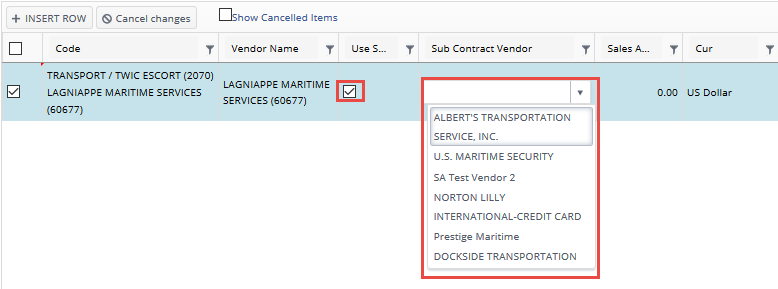
DBA Vendors (“Oceanic”) have been preset in the Vendor Master to allow for the usage of a Sub Contract Vendors. When you choose a DBA Vendor the Use Sub Contract Vendor Checkbox is enabled. By clicking the Use Sub Contract Vendor checkbox you may then select from a list of available Vendors to Sub Contract the selected Service Item to.
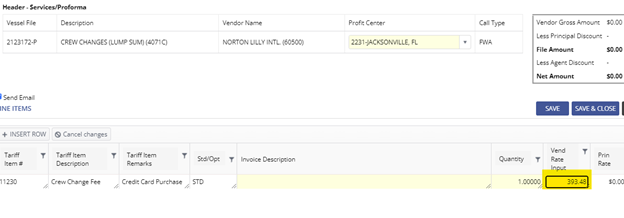
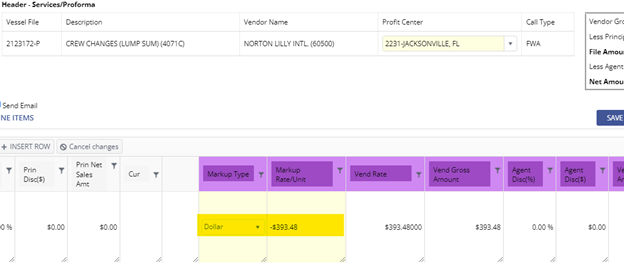
Contra Invoice with nothing to be billed to the Principal. As in the above example we $0.00 the Principal Amounts so that nothing gets billed to the Principal but we still process/pay the Sub Contract Vendor for their Service. This method is particularly useful with the G2 agreement where we are billing G2 lump sum amounts.